
For Supply Chain Managers & Procurement Teams

MRP built on production requirements, not what generic systems assume.

MRP plans from production requirements that already incorporate process losses, formula yields, batch sizing rules, and inventory realities. Purchasing recommendations reflect what production will actually consume.

MRP_Hero_Billiboard

End of month. Finance wants to close the books. Procurement over-ordered mango extract. Again.

Procurement over-ordered mango extract. Again. $22,000 of perishable raw material in the cooler because the underlying production requirement didn’t reflect the 14% process loss in the concentration step. MRP suggested buying 14% more than it should have.

Meanwhile, there’s a shortage on the proprietary fragrance compound for next week’s run. The reorder point was set for individual units, not batch-sized lots. The shortage won’t show up in the system until Thursday when the batch ticket is being picked. The purchase order won’t arrive for 10 days. Production will sit idle for half a shift, unless procurement pays an $850 expedite fee to rush it.

The glycerin recovery from last month’s soap run is sitting in a tank. The system doesn’t count it as available inventory against future requirements. Purchasing is about to order more glycerin that isn’t needed.

1

Yield-blind MRP

MRP plans raw material needs at 100% yield but your process consistently loses 12-15% in processing. You over-order every time. Perishables expire. Finance asks why carrying cost is high.
2

No batch lot-size awareness

MRP suggests buying 47 lbs. Your minimum order is a 50-lb drum and your process requires full batch cycles. The purchase is wrong before it leaves the system. Shortages and overstock happen simultaneously.
3

Co-product planning gap

The glycerin you recover from processing has real value. MRP doesn’t know it exists, so you purchase more than needed while recovered co-product ages in a tank.

Material requirements that reflect how your process actually works, not how a generic system assumes it does.

KEY CAPABILITIES

Material requirements planning built for the complexity of process manufacturing.

Demand-Driven Material Planning
  • Demand-Driven Material Planning
Demand Purchase
  • Purchase orders generated from confirmed MPS orders, open production batches, sales orders, and forecasts in a single planning run.

  • Full supply netting across on-hand inventory, open purchase orders, in-transit receipts, and planned production outputs.

  • MRP run by warehouse, by item, or across a range of items and locations for targeted or enterprise-wide planning.

  • Intermediate batch scheduling integrated into material planning, with sub-assembly and WIP requirements planned alongside raw material procurement.

  • MRP processing run on a scheduled frequency or triggered on demand for consistent, up-to-date planning cycles

Visual Workbench & Planner Visibility
  • Visual Workbench & Planner Visibility
Visual Workbench & Planner Visibility
  • Visual Workbench displaying procurement orders by item, warehouse, and vendor for consolidated planner control.

  • Calendar view of planned orders with drill-down, grouping, analysis, and rescheduling capabilities.

  • Demand-to-supply and supply-to-demand pegging providing full visibility into why and when each item is required.

  • Time-phased planning view showing required production and procurement across short-, medium, and long-range horizons.

  • User-defined planning buckets configurable in days, weeks, months, or any combination to match planning cycles.
Purchase Order Management & Procurement Execution
  • Purchase Order Management & Procurement Execution
  • Automated purchase order creation directly from MRP recommendations, with no manual re-entry from planning output.

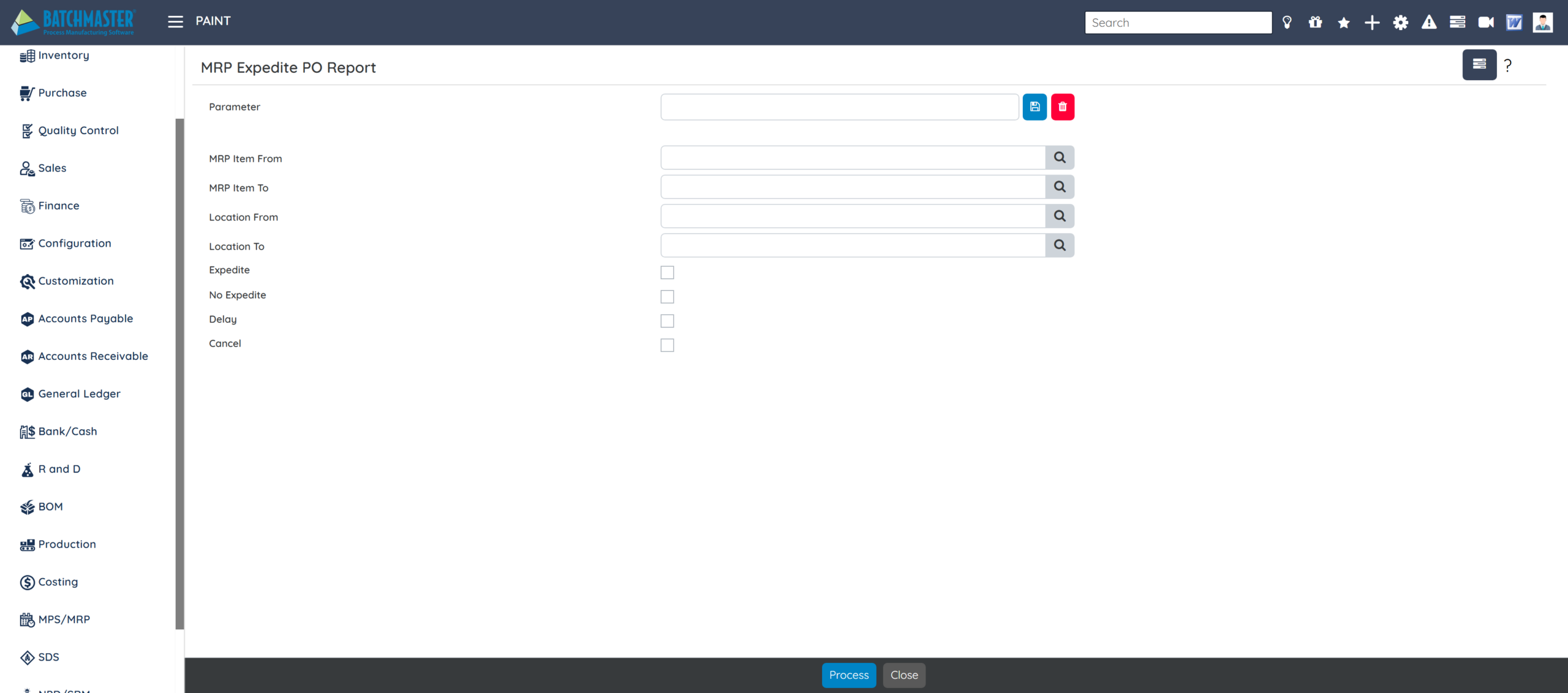
  • Expedite reporting to manage urgent procurement requirements and flag at-risk supply commitments.

  • Auto-conversion of MPS orders to purchase orders and batch production jobs reducing manual planning effort.

  • Vendor and item-level lead time management factored into planned order dates and procurement scheduling.

  • Planned order consolidation and splitting for quantity and date optimization against available capacity.

What-If Analysis & Planning Scenarios
  • What-If Analysis & Planning Scenarios
What-If Analysis & Planning Scenarios
  • What-if scenario analysis to evaluate the impact of demand changes, alternative sourcing, or revised production specifications before committing.

  • Unlimited alternative planning versions for comparison and shortfall identification before requirements reach procurement.

  • Perform demand-to-supply and supply-to-demand pegging to trace requirements back to originating orders.

  • Assess the impact of producing products using different specifications, plants, or process lines on material requirements.

  • Schedule MPS and MRP processing on a frequency or calendar basis for automated, consistent planning cycles.

  • Demand-Driven Material Planning
Demand Purchase
  • Purchase orders generated from confirmed MPS orders, open production batches, sales orders, and forecasts in a single planning run.

  • Full supply netting across on-hand inventory, open purchase orders, in-transit receipts, and planned production outputs.

  • MRP run by warehouse, by item, or across a range of items and locations for targeted or enterprise-wide planning.

  • Intermediate batch scheduling integrated into material planning, with sub-assembly and WIP requirements planned alongside raw material procurement.

  • MRP processing run on a scheduled frequency or triggered on demand for consistent, up-to-date planning cycles

  • Visual Workbench & Planner Visibility
Visual Workbench & Planner Visibility
  • Visual Workbench displaying procurement orders by item, warehouse, and vendor for consolidated planner control.

  • Calendar view of planned orders with drill-down, grouping, analysis, and rescheduling capabilities.

  • Demand-to-supply and supply-to-demand pegging providing full visibility into why and when each item is required.

  • Time-phased planning view showing required production and procurement across short-, medium, and long-range horizons.

  • User-defined planning buckets configurable in days, weeks, months, or any combination to match planning cycles.

  • Purchase Order Management & Procurement Execution
  • Automated purchase order creation directly from MRP recommendations, with no manual re-entry from planning output.

  • Expedite reporting to manage urgent procurement requirements and flag at-risk supply commitments.

  • Auto-conversion of MPS orders to purchase orders and batch production jobs reducing manual planning effort.

  • Vendor and item-level lead time management factored into planned order dates and procurement scheduling.

  • Planned order consolidation and splitting for quantity and date optimization against available capacity.

  • What-If Analysis & Planning Scenarios
What-If Analysis & Planning Scenarios
  • What-if scenario analysis to evaluate the impact of demand changes, alternative sourcing, or revised production specifications before committing.

  • Unlimited alternative planning versions for comparison and shortfall identification before requirements reach procurement.

  • Perform demand-to-supply and supply-to-demand pegging to trace requirements back to originating orders.

  • Assess the impact of producing products using different specifications, plants, or process lines on material requirements.

  • Schedule MPS and MRP processing on a frequency or calendar basis for automated, consistent planning cycles.

What Generic ERP Misses in Process Manufacturing MRP

Generic ERP

  • Planned order dates based on vendor lead time only, with QC inspection and quarantine periods not factored in, so material "arrives" on time but isn't available for production.

  • MRP plans against total on-hand inventory, including QC hold lots, quarantined stock, and material expiring before the next run

  • Supply netting limited to on-hand stock, with open POs and in-transit receipts reconciled separately or not at all.

  • No visual workbench, so planners build the procurement picture by navigating item, vendor, and warehouse reports separately.

  • MRP and production scheduling are separate processes, with purchase orders raised against a plan that may already have changed.

BatchMaster Planning (MRP)

  • Full availability timeline calculated per material, with vendor lead time, QC inspection, and quarantine periods all factored into planned order dates automatically.

  • QC hold, quarantine, and expiring lots are excluded from available supply automatically before requirements are calculated, with no manual correction needed after the run.

  • Full supply consolidation across on-hand inventory, open purchase orders, and in-transit receipts in a single planning run.

  • Visual Workbench consolidates procurement orders by item, warehouse, and vendor in one view with drill-down, rescheduling, and one-click PO conversion.

  • MRP driven directly from live MPS output, so when the production schedule changes, material requirements update in the next planning run.

Results from real MRP implementations.

78%

Reduction in perishable ingredient overage in year 1

$1.4 M

Average raw material carrying cost reduction

94%

Fewer emergency purchase orders post-implementation

"The time saving could be really up to 50%, if not more. Manual planning meant constant copy-paste between Excel and other platforms.Now I go to the MRP dashboard and generate purchaseorders in an optimized way."

Amir Banimostafavi,
CEO, Sipco Innovations

FAQs (Frequently Asked Questions)

How do MRP recommendations turn into purchase orders?
Directly. When MRP generates purchase recommendations, the planner reviews them in the planning worksheet and transfers confirmed recommendations into purchase orders in one step, with no manual re-entry between the recommendation and the PO. Vendor, quantity, required date, and item details carry over automatically. From there, purchasing manages the order through receipt in the same system, so the loop from demand signal to received material stays closed without jumping between tools.
What happens when a shortage surfaces after the planning run has already completed?
BatchMaster MRP generates expedite and de-expedite recommendations as part of exception-driven planning. When a demand change, a delayed receipt, or an inventory adjustment creates a gap after the plan has run, the system surfaces it as an actionable exception: which orders need to move earlier, which can be pushed out, and which purchase orders need to be rescheduled. The planner works the exception list rather than rerunning the entire plan from scratch or catching the shortage at the pick step.
How does MRP work alongside MPS? Do they run on the same demand picture?
Yes, and the division of work is explicit in the data. Every item is flagged make or buy at the master level. Items flagged make route to MPS, which decides what to produce and when. Items flagged buy route to MRP, which decides what to purchase and when to receive it. Both modules read from the same demand picture, so what MPS schedules to produce and what MRP orders to consume stay aligned. There is no separate reconciliation step between the two.
Does MRP factor in QC inspection lead times, not just supplier lead times?
Both are factored in. BatchMaster MRP considers supplier lead time and QC inspection lead time together when calculating the date a purchased item needs to be ordered to arrive in time for production. If a raw material typically takes 10 days to arrive and requires a 3-day QC hold before it can be released to the floor, MRP works backwards from the production need date using the combined 13-day window. Materials that arrive on time but sit in QC through a planned run date surface as a risk before the batch is scheduled, not on the day it is picked.
Process Manufacturing ERP Q&A
Batchmaster
Privacy Overview

This website uses cookies so that we can provide you with the best user experience possible. Cookie information is stored in your browser and performs functions such as recognising you when you return to our website and helping our team to understand which sections of the website you find most interesting and useful.