
Accounts Payable
-

Vendor Payment Control
Pay vendors accurately, on time, and with full control, from a single invoice to a multi-vendor batch run. Every transaction posts to your vendor ledger in real time.

-
Flexible Vendor Payment Processing
Accept cash, bank, and credit card payments and apply against invoices, credit notes, or on-account balances, with real-time vendor ledger updates on every transaction.
-
Batch Payments Across Multiple Vendors
Select vouchers across vendors and post the entire payment run in one step. High-volume AP cycles stay controlled, auditable, and free of manual coordination.
-
Dedicated Debit Note Management
Apply debit notes directly against vendor vouchers from a dedicated screen — no workaround journal, with immediate vendor ledger and GL updates.
-
Non-Inventory Expense Capture
Record services, utilities, and miscellaneous charges via AP Vouchers without a purchase order. Void historical vouchers when needed; GL updates instantly.
-
TDS Payment & Compliance
Handles Tax Deducted at Source payments with jurisdiction-specific posting and tracking, a requirement standard accounting tools simply don't support.
-
Vendor Reporting Built In
Aging reports, outstanding payables snapshots, vendor statements, and 1099 carry-forward workflow included. Know exactly what you owe before anyone asks.


Accounts Receivable
-
Collections & Receivables Clarity
Collect faster, track smarter, and keep receivables clean — with workflows for every edge case from advance applications to bad debt write-offs.

-
Receipts Tied to Every Sale
Record payments via cash, bank, or check against invoices or on-account balances. Receivables stay accurate without any manual reconciliation.
-
Customer Advance Payment Application
A dedicated screen settles advance or on-account receipts against posted invoices, manually or auto-allocated, in one step with no entry duplication.
-
Dedicated Debit Note Application
Apply customer debit notes against invoices from a dedicated screen. Immediate posting to both customer ledger and GL with no manual journal entry required.
-
Non-Inventory Billing & Credit Notes
Bill customers for freight or adjustments via AR Invoices; Credit Notes handle billing corrections with full dimension tagging by project or cost center.
-
Write-Off Approval Workflow
Write off bad debts with reason codes, configurable approval routing, and structured reversal. A full on-system audit trail, no email chain or credit memo workaround.
-
Collections You Can Act On
Customer aging in configurable buckets (0–30, 31–60, 61–90+ days) plus statement reports give your collections team everything needed to follow up accurately.


General Ledger
-
One Accurate Financial Record
The General Ledger consolidates every transaction from production, procurement, and sales into one auditable record — no imports, no duplicate entries, no truncated descriptions.

-
Journal Control That Scales
Create, validate, and batch-post journal entries with built-in balance enforcement, full dimensional tagging, multi-currency support, and reversal handling.
-
Multi-Company GL Consolidation
Consolidate GL across entities with intercompany elimination built in. Drill from consolidated financials to individual source transactions with no manual workarounds.
-
Full GL Description Traceability
Every GL posting carries the full batch, SOP, or transaction reference, not truncated, so audit questions are answered directly from the ledger, not someone's inbox.
-
Budget vs. Actual with Cost Allocation Rules
Build period-wise budgets from history or Excel import with variable and fixed cost rules. Actuals post against budgets in real time for immediate variance visibility.
-
Automated Cost Allocation
Define distribution rules once; BatchMaster splits shared costs across departments automatically, no recurring manual journal entry ever needed.
-
Year-End Close Without the Scramble
Automates income/expense transfer to retained earnings. Run a trial close to validate, then finalize with audit-ready records from day one of the new fiscal year.


Bank Reconciliation
-
Books and Bank, Always in Sync
Centralized control across every bank account, currency, and cash-handling point — with a reconciliation engine that catches gaps before they become period-close problems.

-
One Control Center for Every Bank Account
Bank Master centralizes account details, GL mappings, currency settings, overdraft limits, and authorized users. Bank charges and interest are fully traceable.
-
Dedicated Checkbook Management
Maintain check ranges, issue dates, and usage status per bank account, preventing duplicate or unauthorized check usage with a full audit trail.
-
Contra Entry — Bank & Cash Transfers
Transfer funds between bank accounts, cash accounts, or bank-to-cash in a single contra entry. No workaround journal entries or out-of-balance intermediary steps.
-
Cash Management with Guardrails
Cash Master defines who handles cash, transaction limits, and linked GL accounts per branch. Multi-branch environments stay accountable without extra overhead.
-
Reconciliation That Actually Reconciles
Match transactions to bank statements across accounts and currencies. Automatic reconciliation handles volume, your team reviews only the exceptions.
-
No Missed Entry Left Behind
Bank charges, interest income, and statement adjustments are captured during reconciliation. Records stay complete and audit-ready without a separate correction cycle.


Reporting & Analytics
-
Financial Reporting & Analytics
Reporting draws directly from the same platform where every transaction is recorded — no export step, no version mismatch, from daily KPI dashboards to audit-ready statutory statements.

-
Role-Specific KPI Dashboard
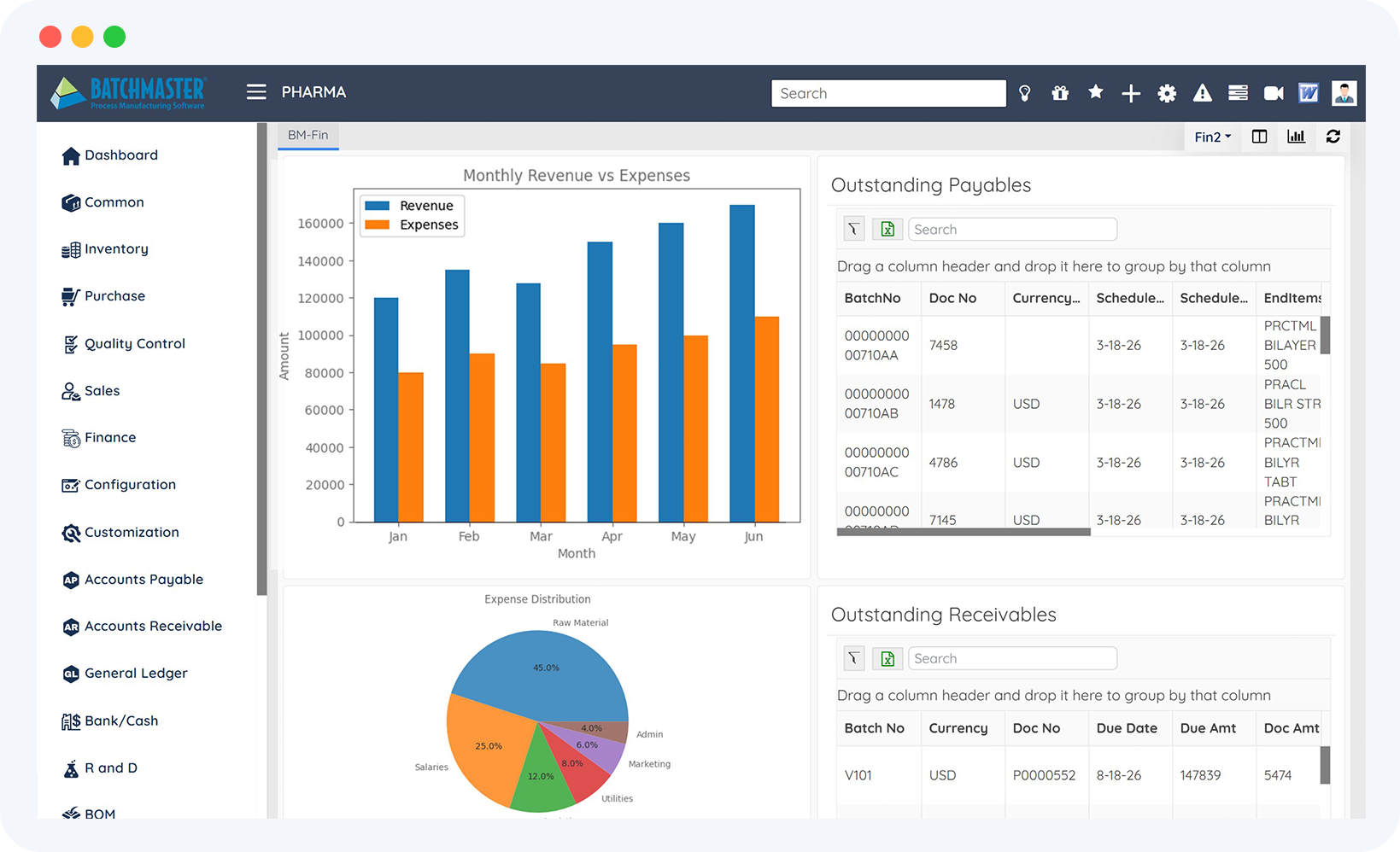
AP aging, AR outstanding, budget variance, and cash position on one dashboard per role, with two-click drill-down to the source transaction.
-
Trial Balance Before You Close
Validate debit/credit balance across every account before statutory reporting. Filter by department, region, or account group to catch discrepancies early.
-
Income Statement with Year-Over-Year View
Revenue, expenses, and net results for any period alongside one or two prior years. Trend analysis and growth measurement without a spreadsheet.
-
Balance Sheet for Every Stakeholder
Assets, liabilities, and equity at a point in time with prior-period comparisons. Liquidity and solvency questions answered in minutes for leadership, lenders, or auditors.
-
Ledger Drill-Down to the Source
Account-level transaction history filtered by date, account group, or dimension. Where audit requests, reconciliation checks, and variance investigations start and finish.
-
Save, Reuse, and Export Any Report
Save filter configurations for next time, export to Excel or PDF in one click, and configure column layouts per user. No repeat setup required.


-
Accounts Payable
-
Accounts Receivable
-
General Ledger
-
Bank Reconciliation
-
Reporting & Analytics
-
Vendor Payment Control
Pay vendors accurately, on time, and with full control, from a single invoice to a multi-vendor batch run. Every transaction posts to your vendor ledger in real time.
-
Flexible Vendor Payment Processing
Accept cash, bank, and credit card payments and apply against invoices, credit notes, or on-account balances, with real-time vendor ledger updates on every transaction.
-
Batch Payments Across Multiple Vendors
Select vouchers across vendors and post the entire payment run in one step. High-volume AP cycles stay controlled, auditable, and free of manual coordination.
-
Dedicated Debit Note Management
Apply debit notes directly against vendor vouchers from a dedicated screen — no workaround journal, with immediate vendor ledger and GL updates.
-
Non-Inventory Expense Capture
Record services, utilities, and miscellaneous charges via AP Vouchers without a purchase order. Void historical vouchers when needed; GL updates instantly.
-
TDS Payment & Compliance
Handles Tax Deducted at Source payments with jurisdiction-specific posting and tracking, a requirement standard accounting tools simply don't support.
-
Vendor Reporting Built In
Aging reports, outstanding payables snapshots, vendor statements, and 1099 carry-forward workflow included. Know exactly what you owe before anyone asks.
-
Collections & Receivables Clarity
Collect faster, track smarter, and keep receivables clean — with workflows for every edge case from advance applications to bad debt write-offs.
-
Receipts Tied to Every Sale
Record payments via cash, bank, or check against invoices or on-account balances. Receivables stay accurate without any manual reconciliation.
-
Customer Advance Payment Application
A dedicated screen settles advance or on-account receipts against posted invoices, manually or auto-allocated, in one step with no entry duplication.
-
Dedicated Debit Note Application
Apply customer debit notes against invoices from a dedicated screen. Immediate posting to both customer ledger and GL with no manual journal entry required.
-
Non-Inventory Billing & Credit Notes
Bill customers for freight or adjustments via AR Invoices; Credit Notes handle billing corrections with full dimension tagging by project or cost center.
-
Write-Off Approval Workflow
Write off bad debts with reason codes, configurable approval routing, and structured reversal. A full on-system audit trail, no email chain or credit memo workaround.
-
Collections You Can Act On
Customer aging in configurable buckets (0–30, 31–60, 61–90+ days) plus statement reports give your collections team everything needed to follow up accurately.
-
One Accurate Financial Record
The General Ledger consolidates every transaction from production, procurement, and sales into one auditable record — no imports, no duplicate entries, no truncated descriptions.
-
Journal Control That Scales
Create, validate, and batch-post journal entries with built-in balance enforcement, full dimensional tagging, multi-currency support, and reversal handling.
-
Multi-Company GL Consolidation
Consolidate GL across entities with intercompany elimination built in. Drill from consolidated financials to individual source transactions with no manual workarounds.
-
Full GL Description Traceability
Every GL posting carries the full batch, SOP, or transaction reference, not truncated, so audit questions are answered directly from the ledger, not someone's inbox.
-
Budget vs. Actual with Cost Allocation Rules
Build period-wise budgets from history or Excel import with variable and fixed cost rules. Actuals post against budgets in real time for immediate variance visibility.
-
Automated Cost Allocation
Define distribution rules once; BatchMaster splits shared costs across departments automatically, no recurring manual journal entry ever needed.
-
Year-End Close Without the Scramble
Automates income/expense transfer to retained earnings. Run a trial close to validate, then finalize with audit-ready records from day one of the new fiscal year.
-
Books and Bank, Always in Sync
Centralized control across every bank account, currency, and cash-handling point — with a reconciliation engine that catches gaps before they become period-close problems.
-
One Control Center for Every Bank Account
Bank Master centralizes account details, GL mappings, currency settings, overdraft limits, and authorized users. Bank charges and interest are fully traceable.
-
Dedicated Checkbook Management
Maintain check ranges, issue dates, and usage status per bank account, preventing duplicate or unauthorized check usage with a full audit trail.
-
Contra Entry — Bank & Cash Transfers
Transfer funds between bank accounts, cash accounts, or bank-to-cash in a single contra entry. No workaround journal entries or out-of-balance intermediary steps.
-
Cash Management with Guardrails
Cash Master defines who handles cash, transaction limits, and linked GL accounts per branch. Multi-branch environments stay accountable without extra overhead.
-
Reconciliation That Actually Reconciles
Match transactions to bank statements across accounts and currencies. Automatic reconciliation handles volume, your team reviews only the exceptions.
-
No Missed Entry Left Behind
Bank charges, interest income, and statement adjustments are captured during reconciliation. Records stay complete and audit-ready without a separate correction cycle.
-
Financial Reporting & Analytics
Reporting draws directly from the same platform where every transaction is recorded — no export step, no version mismatch, from daily KPI dashboards to audit-ready statutory statements.
-
Role-Specific KPI Dashboard
AP aging, AR outstanding, budget variance, and cash position on one dashboard per role, with two-click drill-down to the source transaction.
-
Trial Balance Before You Close
Validate debit/credit balance across every account before statutory reporting. Filter by department, region, or account group to catch discrepancies early.
-
Income Statement with Year-Over-Year View
Revenue, expenses, and net results for any period alongside one or two prior years. Trend analysis and growth measurement without a spreadsheet.
-
Balance Sheet for Every Stakeholder
Assets, liabilities, and equity at a point in time with prior-period comparisons. Liquidity and solvency questions answered in minutes for leadership, lenders, or auditors.
-
Ledger Drill-Down to the Source
Account-level transaction history filtered by date, account group, or dimension. Where audit requests, reconciliation checks, and variance investigations start and finish.
-
Save, Reuse, and Export Any Report
Save filter configurations for next time, export to Excel or PDF in one click, and configure column layouts per user. No repeat setup required.
“I could not literally do my job without all the reporting access that I have within BatchMaster. It has been extremely helpful to have the ability to manipulate reporting within BatchMaster for items that are business crucial."

“If we need to drill down on something, we can do it. That level of granularity has helped us improve how we manage working capital, streamline purchasing, and rationalize our product lines."

“If anything is happening on the manufacturing side, it can automatically be transferred to the financials.It works great because it's an all-in-one solution."