📚 New Blog Posts
1. The Complete Procure-to-Pay Process for Process Manufacturers: From Demand Planning to Final Payment
2. This Month in Process Manufacturing | May 2026
3. Morehouse Foods Gains Real-Time Visibility and Recall-Ready Traceability with BatchMaster Web ERP
Understanding Planning in Process Manufacturing
Planning in process manufacturing is fundamentally more complex than planning in discrete manufacturing and that complexity has direct consequences for how ERP systems need to be built, how MPS (Master Production Scheduling) and MRP (Material Requirements Planning) need to function, and how manufacturers manage the gap between customer demand and production reality.
The reason is straightforward: process manufacturers do not assemble fixed components into finished products. They transform raw materials through formulas, recipes, and chemical or biological processes, where yields vary, batch sizes are constrained, ingredients have shelf lives, and a single formula change can ripple through every downstream planning calculation. Standard ERP planning tools are not built for this environment, and the gap between what they offer and what process manufacturers need is where MPS and MRP become critical.
In discrete manufacturing, a finished product is assembled from a fixed set of components. One bicycle always takes exactly two wheels, one frame, and one set of handlebars. The BOM is fixed, the quantities are exact, and planning is relatively predictable.
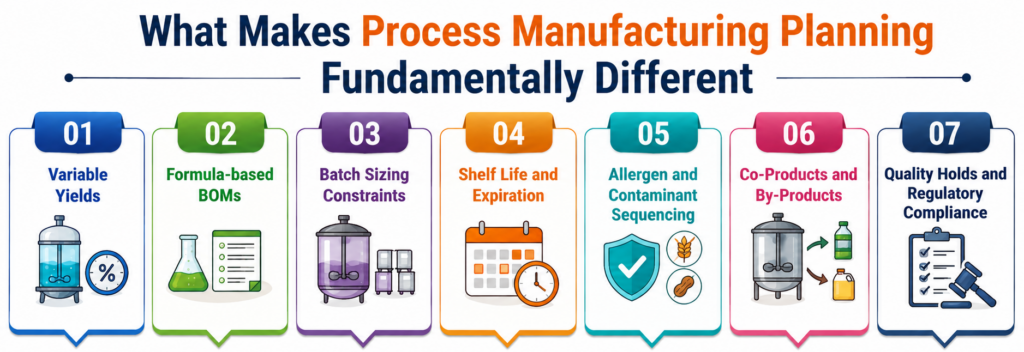
In process manufacturing, you transform raw materials using formulas and recipes, and the outputs can vary. A batch of pharmaceutical tablets, a run of specialty paints, or a production cycle of nutraceutical capsules all involve:
- Variable Yields: The quantity of usable finished product from a given set of raw material inputs is not always fixed. It depends on batch conditions, ingredient quality, equipment behavior, and process parameters. MRP must account for expected yield loss at every level of production.
- Formula-based BOMs: Rather than fixed component quantities, process manufacturers work with ingredient percentages, weight-based ratios, and multi-level formulas. Changing one ingredient or batch size can ripple through all downstream calculations.
- Batch Sizing Constraints: You cannot produce half a reactor batch or a partial mixing run. Minimum and maximum batch sizes, lot size multiples, and equipment capacities are real constraints that planning must respect.
- Shelf life and expiration: Raw materials and finished goods have defined usability windows. Planning must ensure that what is procured can be consumed before expiration, and that finished goods reach customers within their distribution life.
- Allergen and contaminant sequencing: Food and beverage manufacturers must sequence production runs carefully to avoid cross-contamination, directly affecting how batch jobs are grouped and scheduled.
- Co-products and by-products: A single reactor batch may yield multiple outputs simultaneously. All outputs must be tracked and incorporated into planning calculations.
- Quality holds and regulatory compliance: Finished goods may not be available for shipment until quality tests clear. Planning must incorporate hold periods into supply availability calculations.
Why Generic ERP Planning Tools Fall Short
Traditional ERP systems carry planning assumptions built for discrete or distribution-focused businesses. Their BOM explosion logic assumes fixed quantities per unit. Their planning engines don’t understand yield adjustments, formula-based ingredient ratios, or batch size constraints. Their inventory netting may ignore shelf life or quality hold status.
The result is that planners in process manufacturing environments end up compensating for their ERP’s limitations with spreadsheets, manual calculations, and institutional knowledge, creating exactly the planning risk that an ERP is supposed to eliminate. Inventory shortages, excess stock, production stoppages, and missed customer commitments often follow.
The Solution: Integrated MPS and MRP Built for Process Manufacturing
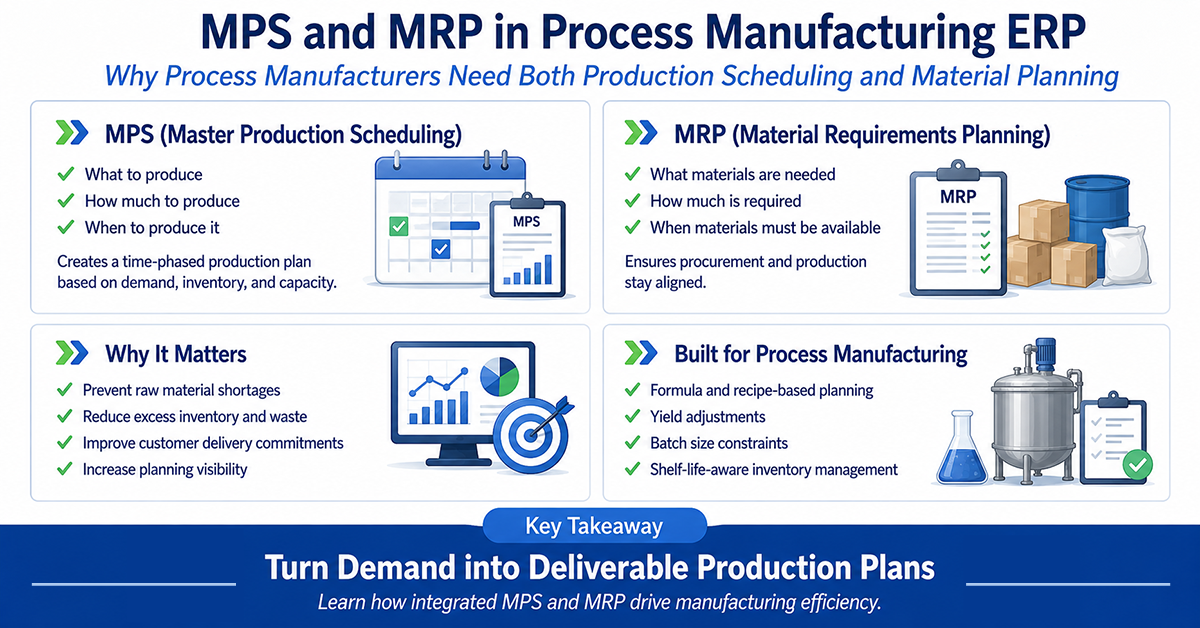
MPS and MRP are the two core planning engines within a process manufacturing ERP. Together they answer the two fundamental questions of manufacturing planning:
MPS answers: What do we need to produce, how much, and when?
MRP answers: What raw materials and intermediates do we need to procure or produce, and when?
What Is Master Production Scheduling (MPS)?
Master Production Scheduling is the production planning function that determines what finished goods (or intermediate products) need to be produced, in what quantities, and by what dates. It is the operational master plan: a time-phased statement of what the company expects to manufacture, expressed in specific items, quantities, and dates.
According to ASCM (formerly APICS), the master production schedule is a statement of what the company plans to produce taking into account not just the sales forecast, but also the production plan, backlog, material availability, capacity, and management goals. It is not simply a restatement of the forecast; it is the result of a deliberate scheduling process that balances all these factors.
In a process manufacturing context, MPS is the anchor for all downstream decisions. Purchasing, warehousing, production, and customer delivery commitments all depend on it.
What Feeds into MPS
BatchMaster’s MPS module draws from multiple demand and supply signals to build a complete, horizon-based picture of what needs to be produced:
- Sales orders: Confirmed customer orders representing firm demand that drive near-term production requirements.
- Demand forecasts: Forward-looking projections used to plan production beyond the confirmed order horizon. BatchMaster blends forecast and actual order demand, with sales orders consuming forecast quantities to prevent double counting.
- Open production orders: Batch jobs already in process or scheduled, representing existing supply commitments.
- Inventory levels: Current on-hand stock, excluding quality-hold inventory, not yet available for use.
- Batch production jobs and receipts: Scheduled completions and inbound supply that contribute to available inventory within the planning horizon.
What MPS Produces
The output of an MPS run is a time-phased production schedule that can be converted into planned batch production jobs. It provides a detailed, actionable plan showing which items need to be produced, in what quantities, at which plant or production line, and by what date. MPS in BatchMaster also maintains two critical balancing metrics drawn from foundational MPS methodology:
- Projected Available Balance (PAB): A period-by-period projection of what will be in inventory at each point in the planning horizon, used by the system to identify potential supply shortfalls and trigger planned production orders before shortages occur.
- Available-to-Promise (ATP): The uncommitted portion of planned supply that can be promised to customers without modifying the existing master schedule. This gives sales and customer service teams an honest, system-calculated basis for delivery commitments.
The MPS Planning Horizon
BatchMaster’s MPS supports user-defined planning buckets, allowing schedulers to plan across short, medium, and long-range horizons simultaneously. Planners can configure planning periods in days, weeks, months, years, or any combination, matching the planning cadence to the operational reality of their specific business and industry.
A food manufacturer working with highly perishable products might plan in daily buckets over a 6-week horizon. A chemical manufacturer running long reactor campaigns might plan in monthly buckets for 12 months. BatchMaster accommodates both, as well as hybrid configurations that shift from daily to weekly planning as the horizon extends.
BatchMaster also supports Planning Time Fences boundaries within the planning horizon that determine how much control the scheduler retains versus how much the system can automate. Inside the time fence, the master scheduler controls all supply orders; only released orders and firm planned orders exist here. Outside the fence, the system can generate and adjust computer-planned orders automatically. This balance between human control and system automation is central to effective MPS management.
What Is Material Requirements Planning (MRP)?
Material Requirements Planning is the planning engine that determines what raw materials, packaging components, and intermediate products a manufacturer needs to procure or produce internally, and exactly when those items must be available. If MPS is the production plan, MRP is the procurement and supply plan that makes that production plan executable.
MRP works downstream from MPS. It takes the period-based production schedule generated by MPS, explodes the formulas and recipes associated with each planned batch job, and calculates gross material requirements, nets them against available inventory and existing supply commitments, and offsets those requirements against supplier and production lead times to determine when procurement and production activities must begin.
The result is a time-phased plan of planned purchase orders and intermediate production orders, that helps materials are available precisely when production requires them.
How MRP Works: The Calculation Logic
BatchMaster’s MRP engine follows a logical, automated sequence with each planning run:
Step 1: Demand Input
Demand input; MRP pulls demand from firm planned MPS orders, open production batches, sales orders, and forecasts. This consolidated demand picture is the foundation for all subsequent calculations.
Step 2: Formula and Recipe Explosion
Formula explosion for each planned batch job, the system explodes the associated recipe or formula to determine the quantity of each ingredient, packaging component, or intermediate product required. In process manufacturing, this means applying weight-based ingredient percentages and adjusting for expected yield loss at every level.
Step 3: Inventory Netting
Inventory netting gross requirements are netted against available on-hand stock. Critically, BatchMaster’s MRP excludes expired inventory and quality-hold inventory from available supply, a necessary safeguard that conventional ERP systems often miss.
Step 4: Open Supply Netting
Open order netting, scheduled purchase orderreceipts,and planned receipts are subtracted from net requirements, ensuring that materials already on order are notdouble ordered.
Step 5: Planned Order Generation
Order generation remaining net requirements generate planned purchase orders and intermediate production orders, scheduled against production need dates and supplier lead times.
MPS vs. MRP: Key Differences
MPS and MRP address related but distinct planning problems. They are complementary tools in the same planning hierarchy, not alternatives to each other. The table below summarizes the key differences across the dimensions that matter most to process manufacturing planners.
| Dimension | MPS (Master Production Scheduling) | MRP (Material Requirements Planning) |
| Core Question | What should we produce, how much, and when? | What materials must we procure or produce, and when? |
| Primary Purpose | Creates the time-phased finished goods production plan | Calculates net material requirements and generates procurement/production orders |
| Planning Horizon | Medium to long range – weeks to months | Near to medium range – tied directly to the production schedule |
| Primary Inputs | Sales orders, demand forecasts, open production jobs, inventory levels, receipts | Firm MPS orders, open production batches, on-hand inventory, open POs, formula/recipe library |
| Primary Outputs | Horizon-based batch production job schedule; PAB; ATP | Planned purchase orders; planned intermediate production orders; exception alerts |
| Primary User | Production scheduler / planning manager | Procurement planner / purchasing manager |
| Level of Detail | Finished goods and top-level intermediates | Raw materials, packaging, sub-intermediates, to the lowest BOM level |
| Relationship to Other | Runs first; its outputs are the demand input for MRP | Runs after MPS; depends on firmed MPS orders for its demand signal |
| Key Tool in BatchMaster | Scheduling dashboard: calendar view, allergen/item/priority groupings | Procurement workbench: consolidated supply/demand view, expedite reports, drill-down |
How MPS and MRP Work Together: The Planning Hierarchy
MPS and MRP are not independent tools; they form a tightly integrated planning hierarchy in which the output of one drives the input of the other. MPS precedes the MRP function: it focuses on planning the whole production process and creates production orders, while MRP uses data from the formula library, inventory, and MPS to calculate future material requirements and generate purchase orders.
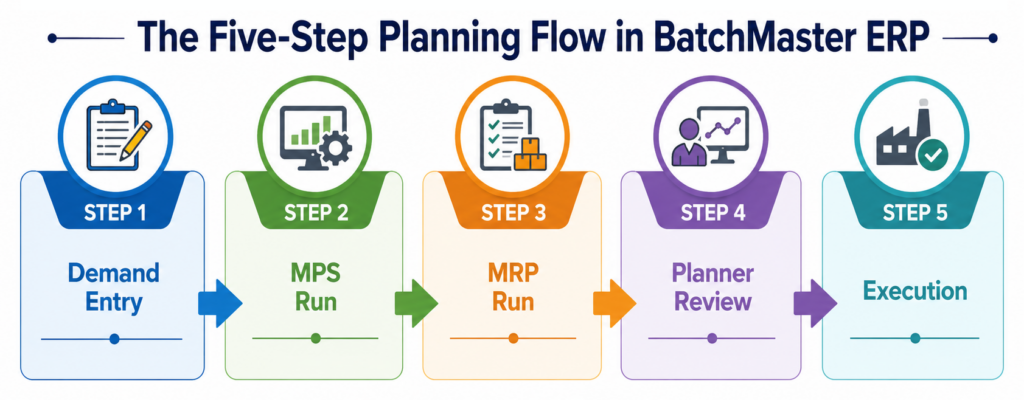
Step 1: Demand Entry
Sales orders and demand forecasts are entered into BatchMaster, creating the demand picture. Open production orders and current inventory levels provide the existing supply picture. BatchMaster aggregates all demand sources, confirmed orders, forecasts, and open jobs into a unified view.
Step 2: MPS Run
BatchMaster’s MPS engine processes demand and supply data, applies planning rules and time fence constraints, and generates a time-phased schedule of planned batch production jobs. Schedulers review the output in the scheduling dashboard, evaluate groupings, adjust timings, and firm up the plan before it feeds MRP.
Step 3 MRP Run
With the MPS firmed, BatchMaster’s MRP engine takes planned batch jobs as its demand input, explodes the associated formulas to the lowest BOM level, nets requirements against available inventory (excluding expired and hold stock), and generates planned purchase orders and intermediate production orders.
Step 4 Planner Review
Procurement planners review MRP output in the planning workbench. They evaluate planned purchase orders, review exception alerts and expedite reports, confirm or adjust order quantities and dates, and release confirmed orders to initiate procurement. Full pegging allows planners to trace every planned order back to the production job and customer demand driving it.
Step 5 Execution
Confirmed purchase orders are released to suppliers. Confirmed batch production jobs are released to the shop floor. As receipts arrive and production progresses, inventory updates in real time, feeding accurate data back into the next planning cycle, keeping the plan current.
The BatchMaster Planning Dashboard: Connecting MPS and MRP
- Provides schedulers with a real-time calendar view of all planned batch jobs, with full drill-down to supply and demand relationships for any order.
- Allows batch jobs to be evaluated and grouped by allergen, item type, or production priority, essential for process manufacturers managing sequencing constraints.
- Gives procurement planners a consolidated supply and demand view across all warehouses and facilities in a single workbench.
- Surfaces exception alerts and expedite reports that direct planners to items requiring immediate action, before they become production stoppages.
- Connects MPS scheduling decisions directly to MRP procurement calculations, so a schedule change immediately flows through to material requirements.
Why MPS and MRP Are Critical for Process Manufacturers
For process manufacturers, poor planning has immediate and costly consequences. Raw material that arrives late stops a batch run. An over-purchase based on stale inventory data creates excess stock that expires before it can be used. A production schedule that ignores capacity constraints creates undeliverable commitments to customers.
Prevent Raw Material Shortages, Wastage, and Production Stoppages
BatchMaster’s MRP engine continuously calculates material requirements against the confirmed production plan, generating planned purchase orders with sufficient lead time to ensure raw materials arrive before they are needed. The system also accounts for vendor lead times, quality clearance periods, and quarantine days in its order timing calculations. Exception alerts and expedite reports flag potential shortages before they become stoppages, giving procurement teams time to act rather than react.
Equally important, MRP prevents over-purchasing. By precisely netting gross requirements against on-hand inventory, pending receipts, and real demand by excluding expired or on-hold inventory from available supply, BatchMaster ensures that procurement recommendations reflect actual need, not overstated requirements.
Maintain Optimal Inventory Levels Avoiding Both Stockouts and Excess
Balancing inventory levels is a constant challenge in process manufacturing. Underestimate raw material requirements and production can come to a halt. Overestimate them and excess inventory consumes warehouse space, shortens shelf life, and ties up working capital in materials that may never be used.
MRP resolves this tension systematically. By calculating the exact net quantity required, considering current stock, pending receipts, and time-phased demand. BatchMaster helps manufacturers procure what they need, when they need it, in quantities aligned with actual production requirements. The result is optimized inventory turns, reduced carrying costs, and significantly less waste from expired or obsolete materials.
Reduce Carrying Costs and Improve Working Capital
Excess inventory is expensive beyond the cost of the materials themselves. Storage space, handling labor, insurance, and the risk of spoilage or obsolescence all add to the true cost of holding too much stock. For process manufacturers working with temperature-controlled ingredients, regulated compounds, or raw materials with short shelf lives, the financial consequences of over-stocking can be severe.
BatchMaster’s integrated MRP reduces these costs by ensuring procurement decisions are driven by precise, time-phased calculations, not conservative over-ordering designed to compensate for planning uncertainty. The capital freed from excess inventory is capital available for other productive uses.
Meet Customer Delivery Commitments with Greater Confidence
An MPS that accurately reflects production capacity, and material availability gives sales and customer service teams a reliable basis for delivery commitments. BatchMaster’s Available-to-Promise (ATP) capability, calculated directly from the master production schedule, shows exactly how much product can be promised without modifying existing plans. Full pegging from finished goods back through production jobs and raw material orders means that the customer impact of any supply disruption can be assessed immediately and communicated proactively.
Achieve Better Visibility into Supply vs. Demand Imbalances
BatchMaster’s planning dashboard provides real-time visibility to where supply and demand are out of alignment, by item, by date, by facility, and across the full planning horizon. With interactive graphical production visibility, manufacturers can view bottlenecks immediately, act proactively, and ensure material availability before gaps become crises.
Enable Planners to Respond to Demand Changes Faster
When demand shifts whether from an unexpected large order, a cancellation, or an accelerated schedule, the downstream impact on open purchase orders and production schedules is immediate. BatchMaster’s integrated MPS and MRP allows planners to rerun the planning cycle rapidly against the revised demand picture, with exception alerts and expedite order recommendations automatically surfacing which open orders are affected, which need to be accelerated, and which can be deferred without requiring a manual review of the entire procurement pipeline.
Support Multi-Facility and Multi-Warehouse Operations
BatchMaster generates MPS and MRP planning across multiple plants and warehouses, with planners able to run MRP by individual warehouse, item range, or across the full planning population. Planning is managed location-wise, giving each facility a clear, accurate view of its own supply and demand position. Where a material shortage exists at one warehouse, but stock is available at another, planners can fulfill that demand through an inter-warehouse transfer, moving inventory across locations rather than triggering an unnecessary purchase order. This visibility across the network ensures procurement decisions are made with full knowledge of what exists across the entire operation.
Efficient Use of Resources
Effective MPS and MRP planning extend beyond materials to resource utilization. When production is scheduled based on real demand, not guesswork or excessive buffers, equipment runs at appropriate capacity; labor is allocated efficiently, and setup and cleaning cycles are optimized through intelligent batch sequencing. BatchMaster’s finite capacity scheduling capabilities allow manufacturers to factor equipment availability, worker skill sets, and production sequencing rules directly into the planning process, eliminating the wasteful mismatches between plan and reality that plague less integrated approaches.
Watch the Expert Led Webinar: Modern MPS & MRP for Process Manufacturers
Core MRP/MPS Processes in Process Manufacturing ERP
Effective MPS and MRP planning involve a series of interconnected processes. In BatchMaster ERP, these processes run within an integrated system, each feeding the next with accurate, real-time data.
Key MPS Capabilities in BatchMaster
Time-phased batch production scheduling driven by sales orders, forecasts, open production jobs, and inventory levels
- Demand-to-supply and supply-to-demand pegging with full order traceability
- What-if scenario analysis: assess the impact of producing products with different specifications, plants, or process lines before committing
- Multi-plant and multi-warehouse consolidation in a single planning run
- Interactive scheduling dashboard: calendar view, drill-down, analysis, grouping, and rescheduling
- Allergen, item, and priority-based grouping of batch jobs, designed for process manufacturing sequencing constraints
- User-defined planning buckets: short, medium, and long-range horizons in days, weeks, months, years, or any combination
- Analyze and compare unlimited schedule versions to identify shortfalls
- MPS processing scheduled on a frequency or calendar basis
- Auto-conversion of MPS orders to batch production jobs and purchase orders
- Generic products and planning models to forecast and plan capacity at the product family or individual product level
- Packaging requirements and production job outputs pegged to each order for instant customer-specific visibility
Key MRP Capabilities in BatchMaster
- Formula/recipe-based BOM explosion with yield adjustments, weight-based ingredient percentages, and multi-level intermediate handling
- Net requirements calculation netting against on-hand inventory (excluding expired and hold stock), open POs, and planned receipts
- Planned purchase order generation time-phased against production need dates and supplier lead times
- Consolidated demand and supply view across all warehouses in a single MRP workbench
- Visual workbench for procurement order management: drill-down, review, confirm, or adjust planned orders
- Intermediate batch scheduling: planned production orders generated automatically for multi-level formulas
- Expedite reports and procurement action management: exception-driven alerts for late receipts, supply shortfalls, rescheduling needs
- Flexible MRP run options: by item, by item range, by warehouse, or for the full planning population
- Co-product and by-product yield management within the planning engine
- MRP generates the required purchase orders that initiate the procurement process upon confirmation
Here’s what a BatchMaster customer shared about implementing integrated MRP and scheduling:
“We have started implementing the MRP functions and have seen how using MRP reporting along with integrated order scheduling can drastically reduce various manual processes.”
– David Fontenot, IT Director, Diversified Foods and Seasonings
How to Choose MRP/MPS Planning Software for Process Manufacturing
Selecting an MPS/MRP planning solution is a significant decision with long-term operational implications. The right system should reduce manual planning effort, increase procurement accuracy, and scale with the business. The wrong system, discrete-focused, too complex, or poorly integrated, can create as many problems as it solves.
Process Manufacturing Specificity
The single most important criterion is whether the planning system genuinely understands process manufacturing. A purpose-built system handles formula/recipe-based BOM explosion, yield adjustments at every production level, batch sizing constraints, co-product and by-product planning, allergen-based grouping, and shelf-life-aware inventory netting, without customization. Ask vendors to demonstrate these capabilities using realistic scenarios from your specific industry and product types.
Multi-Plant and Multi-Warehouse Support
If your business operates across multiple production facilities or manages inventory at multiple stocking locations, ensure the planning system consolidates requirements and schedules across all locations in a single planning run. Separate planning processes for each facility create coordination gaps, procurement inefficiencies, and visibility blind spots that undermine the value of integrated planning.
Planning Dashboard Usability
Planning software is only valuable if planners use it effectively, and planners will only use it if the interface presents information clearly, supports their workflow, and makes it easy to act on planning recommendations. Evaluate the scheduling dashboard, the procurement workbench, and the exception reporting tools in the context of how your planning team actually works. A system that requires extensive training to navigate basic planning tasks adds friction that slows adoption.
MPS/MRP Evaluation Checklist
- Does the system handle formula/recipe-based BOM explosion natively, with yield loss adjustments?
- Does it enforce batch size constraints (minimum, maximum, lot size multiples)?
- Does it exclude expired and quality-hold inventory from net requirements calculations?
- Does it support co-product and by-product planning?
- Can it run MPS and MRP across multiple plants and warehouses in a single pass?
- Does it provide full demand-to-supply and supply-to-demand pegging?
- Is there a visual planning workbench and interactive scheduling dashboard?
- Does it support allergen-based or priority-based grouping of batch jobs?
- Does it include finite capacity scheduling for high-utilization environments?
- Can MPS orders be automatically converted to batch production jobs and purchase orders?
- Does it support user-defined planning horizons and planning time fences?
- Does the ERP integrate with your existing financial and accounting systems such as QuickBooks, SAP Business One, Microsoft Dynamics, or Sage?
- Does the solution support your preferred deployment model, whether cloud, on-premises, or hybrid, based on your operational, compliance, and IT requirements?
While evaluating MPS and MRP capabilities is critical, manufacturers should also consider how the planning system fits within their broader ERP and IT strategy.
Ready to See BatchMaster’s MPS and MRP in Action?
For process manufacturers, the ability to confidently commit to customers and then consistently deliver starts with planning that actually reflects the complexity of your operation.
BatchMaster’s MPS and MRP modules are designed specifically for formula-based, batch-driven manufacturers. From formula explosion and yield-adjusted net requirements to finite capacity scheduling and multi-plant planning, BatchMaster handles the planning complexity that non-process ERP systems simply cannot address.
With over 3,000 implementations worldwide across food & beverage, pharmaceuticals, chemicals, nutraceuticals, personal care, and paints & coatings and with integration options for QuickBooks, SAP Business One, Microsoft Dynamics, and Sage, BatchMaster brings optimized process manufacturing planning to businesses at every stage of growth.

Get Started with BatchMaster
Request a Personalized Demo of BatchMaster’s MPS & MRP Capabilities